Troubleshooting
Note, while it may not be a bug, players can get the GPS location at which a Blueprint was taken if it is shared. DO NOT upload a Blueprint from the live server to the workshop or share it with others unless you trust them. We will not restore a grid lost due to you uploading a Blueprint of it to the workshop. The best way to share a BP to the workshop is to create it on a private test/creative world with our mod pack loaded.
🧊 Expanse Issue | 🪐 Remnants Issue | 🛰️ Vanilla+ Issue |
|---|
Connection Issues
🧊🪐🛰️
Problem:
Player loads into an "Offline World" single player when trying to join
or
Player repeatedly receives "Server is not responding" as a response when trying to connect
This bug is not unique to Draconis, it is a bug in the Keen multiplayer join system.
or
“Downloading mods has failed! Please check mods in world settings.”
Solution:
1. Primary Fix
Install the TimeOutFix plugin via Pulsar Plugin Loader. Fixes 90%+ of issues.
2. Further Troubleshooting
Try turning it off and on again.
Restart the game client
Restart your Steam client
Reboot your PC
Reboot your router
Change the Steam download region to a different nearby region.
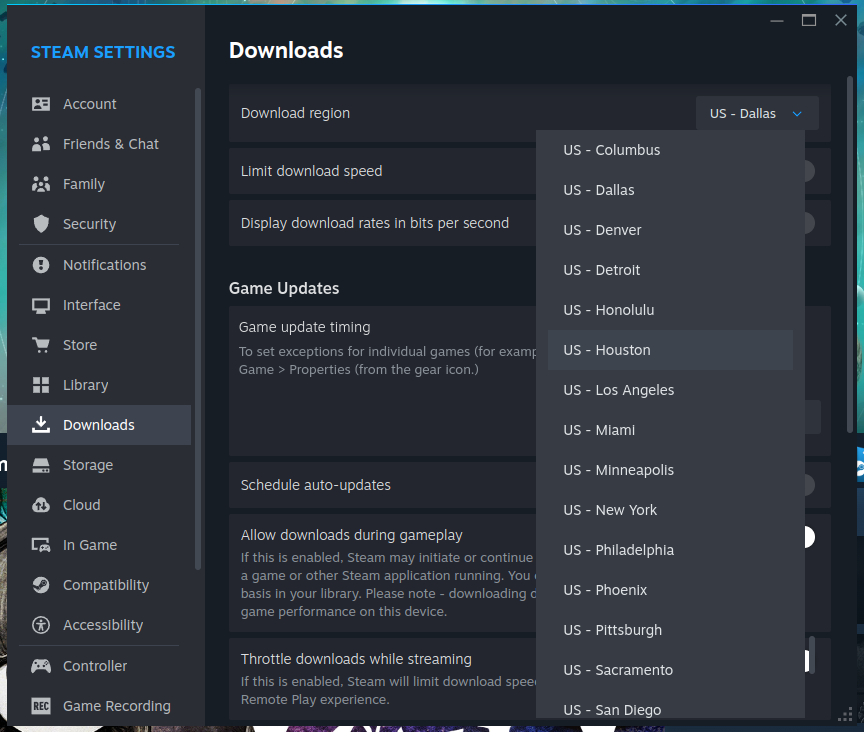
In Steam, go to ‘Steam’ > ‘Settings’ > ‘Downloads’
Allow downloads during gameplay in Steam.
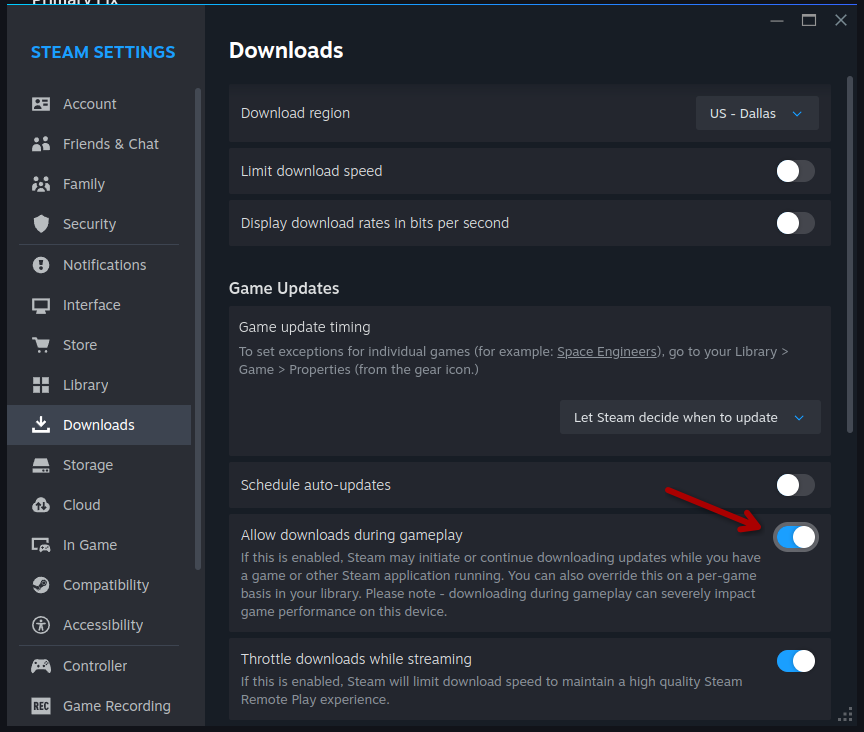
In Steam, go to ‘Steam’ > ‘Settings’ > ‘Downloads’
Log out of Steam, restart it, log back in.
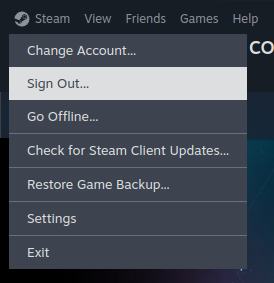
"Sign out", not "Exit"
Run "Verify Integrity of Game Files".
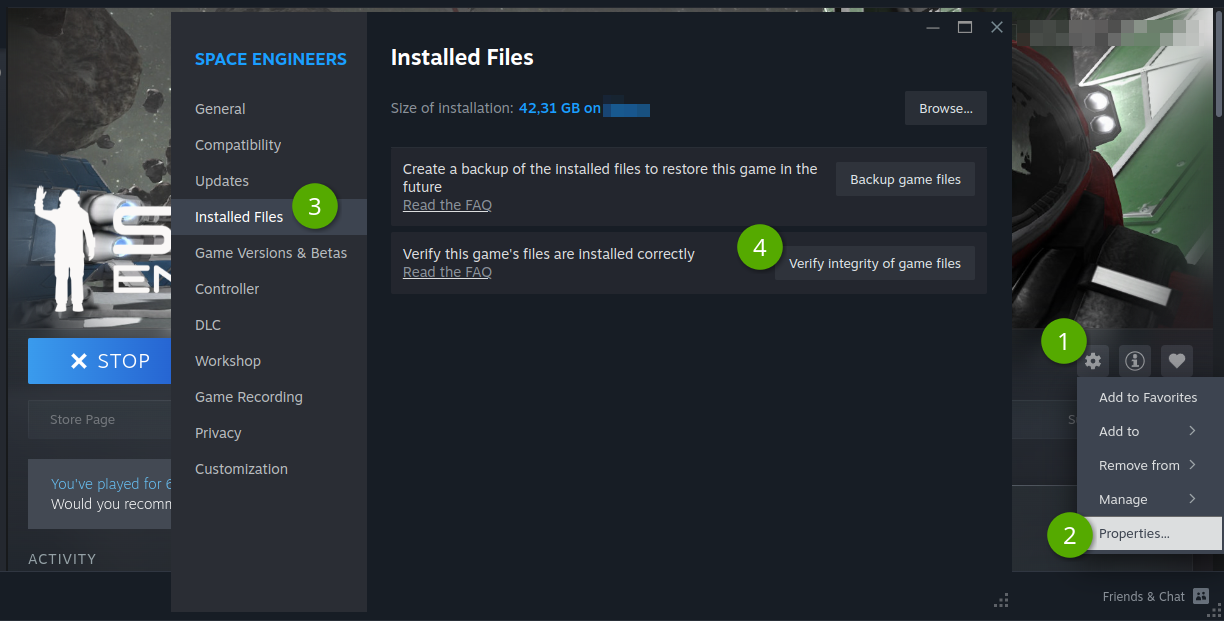
Clear the download cache.
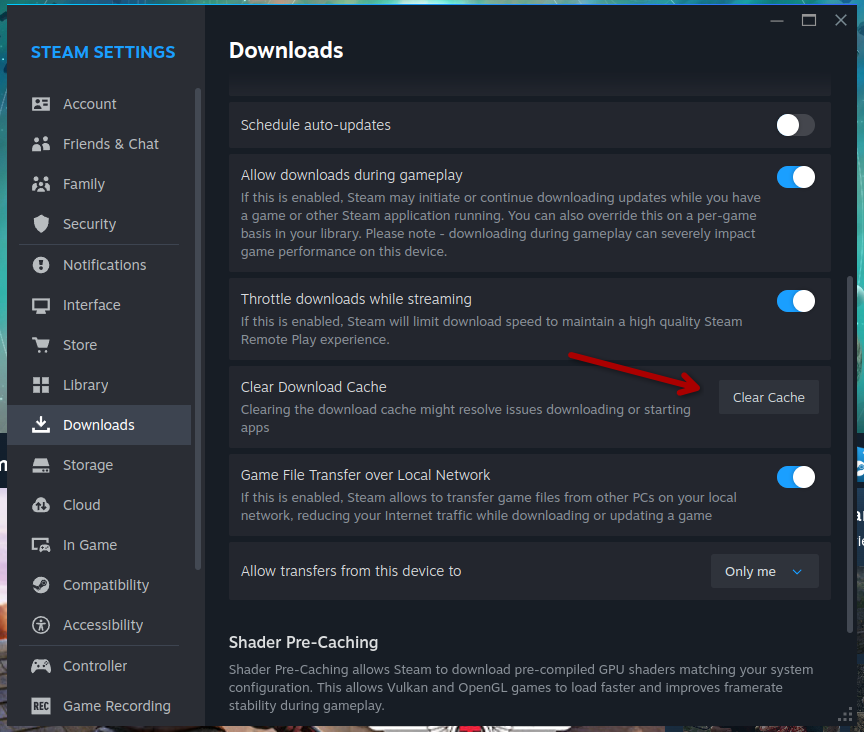
In Steam, go to ‘Steam’ > ‘Settings’ > ‘Downloads’
Wipe your ‘subscribed Mods’ list and Mod Cache
Close the game
Unsubscribe from all SE mods
There’s a button on the right after you open ‘SE Workshop’ > ‘Your Items’ > ‘Subscribed Items’
You can create a collection as backup (also button, same location)
Close Steam
Clear your mod cache
Go to
…\Steam\steamapps\workshop, deleteappworkshop_244850.acfContinue to
...\Steam\workshop\content\244850\and delete all numbered folders in thereIf you only wish to clear mod cache for a specific mod - instead of deleting everything in the
244850folder, simply delete the one whose number matches theModIDof the mod in question.
Start Steam
If the above didn't help then please check out the Steam Support Page for resolving update & installation issues.
3. Diagnostic Tool
If needed, run our network test. Go to https://sdg.knowledgeondemand.net/. Follow the instructions on the website. Pull a ticket in #🎫sigma-support on our discord to send the generated .json file to us.
There was an error while loading the World
🧊🪐🛰️
Problem:
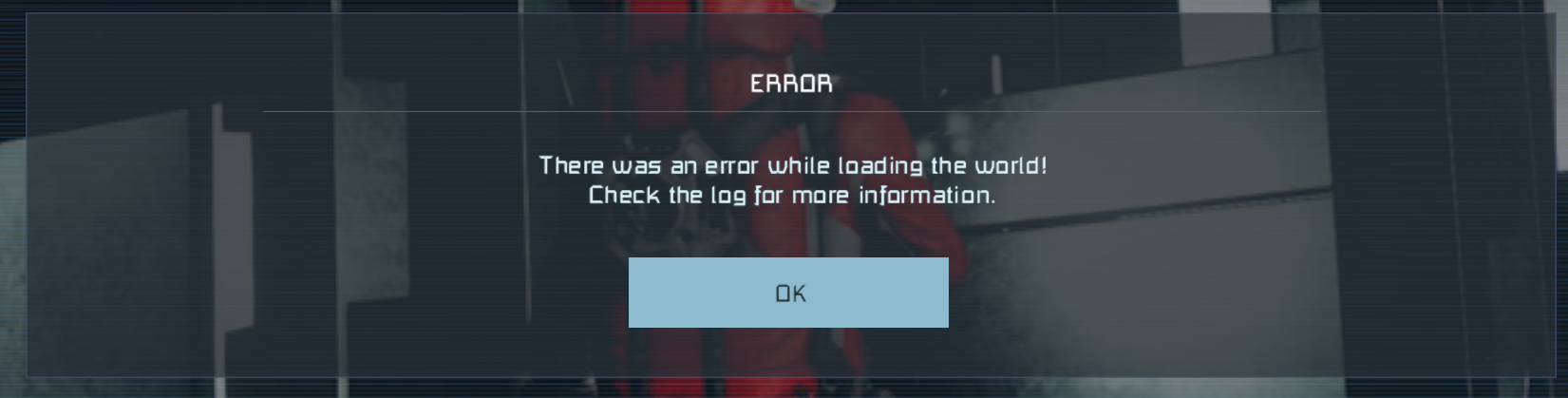
Solution:
Restart your game
If that didn’t do it, clear your mod cache:
Close the game
Go to
…\Steam\steamapps\workshop, deleteappworkshop_244850.acfContinue to
...\Steam\workshop\content\244850\and delete all numbered folders in thereIf you only wish to clear mod cache for a specific mod - instead of deleting everything in the
244850folder, simply delete the one whose number matches theModIDof the mod in question.
Heavy stuttering or Input Delay
🧊🪐🛰️
Problem:
The player is experiencing heavy stuttering and/or Input Delay (a noticeable amount of time passes between pressing a key and the action happening, e.g. F and getting in/out of a seat or cockpit)
Solution:
Sorry, but this one is very likely an issue with your connection to the servers. You can try:
Reconnect (
F5)Restart your game
Disable VPN
Consider using a wired connection
Flush the DNS cache
Open the command line as Admin
Type
ipconfig /flushdns
Restart your PC
Restart your Router
Run an online test for packet loss (Server location is Dallas, TX)
Diagnostic Tool: Go to https://sdg.knowledgeondemand.net/. Follow the instructions on the website. Pull a ticket in #🎫sigma-support on our discord to send the generated .json file to us.
General Issues with Grids
Random Jank
🧊🪐🛰️
Problem:
Something is wrong with my ship!
Solution:
Try, in escalating order:
!fixship!entities refresh- DO NOT run this while seatedReconnect (press
F5)
My ship won’t move
🧊🪐🛰️
Problem:
You step on the gas and nothing happens
Solution:
make sure none of your fuel tanks are in stockpile mode
make sure at least some fuel tanks are on
make sure your drives and thrusters are on
also: cycle thrust override (increase a little → decrease) to fix an ancient vanilla bug
make sure your grid is not in station mode
!fixship
SDX2 specific for grids with a Core:
make sure your Ship Core orientation matches the main drive orientation
make sure your Ship Core is on
Can’t convert grid between ship and station
🧊🪐🛰️
Problem:
The buttons are greyed out.
Solution:
Make sure you’re not in natural gravity
Can’t convert inside a safe zone
You need to own 100% of the grid to convert
If you’re near voxel, you might be stuck. Try:
Pick up some Steel Plates from somewhere
Hangar your grid
Place some Armor Blocks where the grid was (no need to weld them up)
Try unhangaring, confirm ‘Unhangar nearby’
Something is wrong with my Conveyor Network
🧊🪐🛰️
Problem:
Items can’t be moved between inventories
Gas doesn’t flow where it should (e.g. fuel to thrusters)
Solution:
Look at your grid, do /bi cn in chat. It’ll show your conveyor network. On most ships, there should be one network of all yellow lines. Red means something is switched off or damaged below functional. Other colors mean additional separate conveyor networks.
If /bi cn doesn’t reveal any issues, try !fixship.
The buttons on my Programmable Block don’t work
🧊🪐🛰️
Problem:
Clicking the PB buttons (Browse scripts, Edit, Compile, Recompile, Save) does nothing.
Solution:
This is an ancient, known vanilla SE bug. Hold your right mouse button while left clicking and it magically works.
Reminder that you need to get the Scripter role via support ticket to be allowed to even use Scripting & Programmable Blocks.
Turn rate is bad while towing at FnB speeds
🧊
Problem:
While towing another ship via Connector or Magplate, you’re having a hard time turning at high speeds.
Solution:
This is a known Space Engineers bug. We've done as much as we can inside Flip and Burn to improve the turning behaviour, but this bug does become substantially worse when you have a docked ship and have less turning authority. There not much we can do about it, Keen needs to fix their math.
Consider upvoting the official bug report to Keen here.
Limits, Projections, Hangar
My blocklimits are incorrect
🪐🛰️
Problem:
Blocklimiter is telling you you are over limits, either via on screen message or via checking the !blocklimit mylimit command.
Solution:
Use
!fixshipon the gridRun the
!blocklimit update mylimitcommand to update all your limits
Something is wrong with my Ship’s Core
🧊🪐
Problem:
You are speed limited
or
Limited Blocks keep turning off
Solution:
Make sure all your Ship Cores are fully welded
Make sure all your Ship Cores are turned on
Try
!fixship
Core issues in creative
factory reset:
/core reloadconfig→ creative set up commands
Infinite streaming after loading a ship from hangar
🧊🪐🛰️
Problem:
This is related to a bug with having a blueprint loaded into a projector before you hangar, which the base game has issues rendering back in properly right away
Solution:
Use !fixship "GRIDNAME" with quotes around the ship name to fix. You'll know the grid name because you just loaded it from hangar. It is your ship after all..
This can be prevented by making sure you do not hangar a grid with a projector on it with a BP loaded (even if block is turned off):
Grinding off the projector before hangaring (completely ground - not just to below functional)
Running
!fixshipclears all projector data as well
Projected blueprint doesn't show up
🪐🛰️
Problem:
Player loads blueprint into projector; but the projection can not be seen, and a chat message stating "Removed N Blocks" has been sent. This is due to the removal of certain blocks from projections for bug/exploit reasons.
Actually quite rare nowadays.
Solution:
Short term:
Reconnect to the server with F5
Try the
!entities refreshcommandDO NOT run this while seated.
Long term:
Remove the blocks in question in the chat message from your blueprints to avoid hitting this issue
Clearing your Torch Server Mod Cache
This section only exists as a technical reference for users who run their own Torch instances for Space Engineers to host their own server (usually for development or testing purposes). If you don't know what Torch is, you won't need this section.
Before starting, close Torch. You may need to adjust the paths to where you chose to store Torch.
Navigate to
C:\torch-server\Instance\In that folder, locate and delete
appworkshop_244850.acf(244850 is the ID number for SE)Navigate to
C:\torch-server\Instance\content\244850(or wherever your Torch install is located).Select/Highlight all numbered folders inside the
244850folder and delete them.Start Torch and your server and let it redownload mods.
Profit!