Travel
Expanse does not use Jump Drives or FTL. Instead, ships travel around the solar system using continuous acceleration, powered by our custom-built Flip and Burn mod.
For an introduction to Flip and Burn, you can watch the YouTube video below, or read on to find out more.
The Basics
Flip and Burn enables realistic Expanse-style symmetric burn travel. You choose a destination, accelerate towards it until the halfway point, then flip your ship and burn in the opposite direction the rest of the way. Do this correctly and you will come to a halt directly next to your target.
Your travel speed is dictated entirely by how powerful your drives are and the mass of your ship.
Starting your journey
When you reach the maximum combat speed for your ship (see Grid Cores), Flip and Burn unlocks your speed limit, and allows you to accelerate up to 50,000m/s.
At high speeds, the Navigation HUD automatically engages, highlighting notable locations such as planets, moons, or asteroid zones.
Right-clicking on a highlighted location will lock it as a destination and bring up flight guidance.
You can also press the N key at any time to bring up the Navigation Menu.
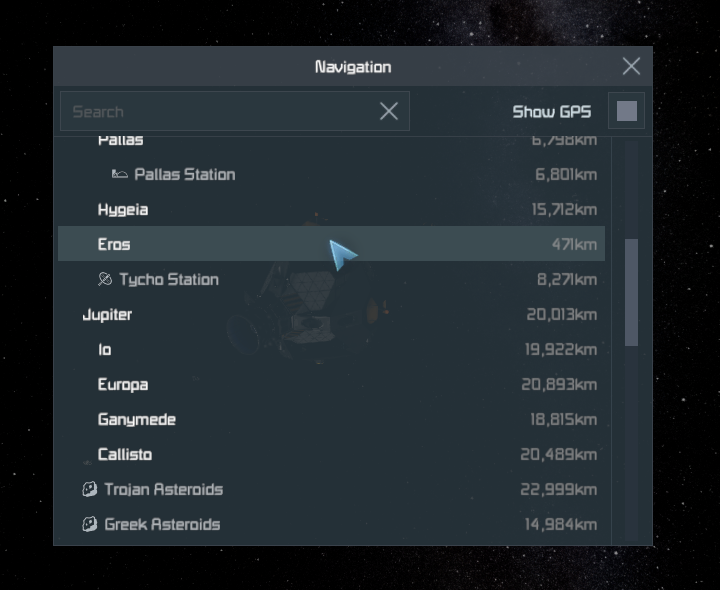
This provides a searchable list of every notable location you have discovered in the Solar System, along with your GPS markers. Selecting an item from this menu locks it as your destination.
Accelerating
Once you have a destination locked, additional information appears to help guide you to your target.
Course indicators appear as large squares along your path. Flying through these will keep you on-course. If you are off-course, you will miss the squares and they will turn red.
The travel ETA displays the time it will take to reach your destination at your current acceleration. Increasing or decreasing your thrust updates the ETA accordingly.
Near the halfway point, the retroburn timer appears. When the timer hits zero you must begin decelerating to avoid overshooting your target. You can also hold Alt at any point earlier in your journey to see this timer.
The retroburn timer tells you when to decelerate, not when to flip. Always leave time to maneuver.
The retroburn timer is calibrated to your current thrust: at higher burns you need less time to decelerate, and the timer will be longer.
Coasting
If you cut thrust and coast, the retroburn timer instead displays the percentage thrust override needed to stop at your destination. This will increase as you continue to approach your target.
Never wait until 100%. You will be unable to provide any additional thrust to course-correct, and you will almost always overshoot.
Decelerating
While decelerating, the retroburn timer is replaced with thrust guidance. Hints will appear to prompt you to increase or decrease thrust as needed to maintain your approach and accurately hit your target.
If your thrust indicator ever displays TOO FAST, it means you’ve mistimed your approach and can’t provide enough thrust to slow down in time. If your target is a planet or moon, you should burn sideways to avoid collision.
Speed Limiting
When near another ship or station, your speed will be limited and you must move further away before Flip and Burn will engage.
Speed limit ranges depend on the type of grid you're near:
Type | Range |
|---|---|
Friendly Ship | 1km |
Friendly Station | 5km |
NPC Station | 5km |
NPC Wreckage | 5km |
Non-Friendly Grid | 30km |
Interception
When a fast-moving ship enters speed-limit range of another, an Interception check is performed.
If the relative velocity between the two ships is low enough that they could stop within speed limit range of each other, both ships are intercepted and their speeds limited. If the relative velocity is too high, they will overshoot and fly right past.
If you detect a signal from another ship, you can right-click to select it as a navigation target and receive the usual flight guidance to assist with an intercept.
Tips
Due to physics, double the thrust only reduces travel time by 30%, but costs twice the fuel and produces a larger signal. Using a lower burn can often be worthwhile unless time is of the essence.
Align your vector early in your journey. The longer you remain off-course, the more time it will take to correct.
Never fly directly to your base from another point-of-interest, as other players may mark your vector and follow you. Fly in a different direction first, and adjust course once underway.
Troubleshooting
My ETA says it will take hours to get anywhere
You have too little acceleration: you're carrying too much cargo, or haven't upgraded the drives on your ship. If you're already at the drive limit for your ship core, consider switching to a core designed for heavy cargo such as the Barge or Hauler.
I've upgraded my drive but my ship's still slow
Make sure your drive is fully constructed. Damaged or partially-constructed drives produce less thrust.
I'm full-burning and keep overshooting my target
At 100% burn you have no margin of error. Use a lower thrust override (e.g. 90%), or begin your retroburn a few seconds early to give yourself some breathing room.
I’m stuck at a low speed and can’t go any faster
Make sure your ship core is turned on, and that your ship doesn’t exceed block or PCU limits.