Ship Cores
Instead of global block limits or PCU-based balancing, Expanse uses a Ship Core system to control the blocks available to your ship and provide combat and gameplay balance.
By default, every new ship (including the starter Rockhopper) is considered a Skiff. These are small, versatile utility ships with modest block limits and a combat speed limit of 400m/s.
You can specialise your ship by placing one of a range of Ship Core blocks. Depending on the type of core, this will significantly increase some block limits and unlock new blocks, but may lock you out of others.
Limits
Block limits are grouped by block type, and each type of ship core has a certain point budget available for each block group. Different blocks may cost different points depending on how powerful they are.
Some blocks may contribute points to multiple limit groups at the same time.
Viewing limits
Pressing Numpad 0 or typing /corehud will toggle the Core overlay. This displays a summary of the limits for the grid you are looking at, along with how much of those limits you have used.
If your HUD is set to Full mode (by cycling Tab), then attempting to place any limited block will show an overlay to tell you the limit(s) it contributes to, and how many points it costs.
The command /core limits can also be used to give a full breakdown of point budgets and which blocks are contributing to them.
Speed limits
Different cores also have different combat speed limits, which apply when in proximity to another ship (see Travel).
As a general rule, Military core types are faster than Civilian cores, and the higher the block limit cap the slower the core is.
Ships require at least 6g of acceleration to reach their maximum speed. If you stop applying thrust, your speed will gradually drop to 300m/s.
Ship Core Blocks
Ship core blocks can be found by searching for “Core” in the block menu.
Each ship can only use a single type of core block, but can have additional copies of that core block for redundancy. If all core blocks on a ship are destroyed, it will revert to a Skiff and any core-exclusive blocks will be disabled.
The first core block you place will determine the direction of your ship. This matters for certain blocks (such as drives or railguns) which are locked to facing a certain direction. All core blocks have prominent arrows on the side to indicate which side is “forward”. All core blocks on a ship must face the same direction.
There are three categories of Ship Core: Civilian, Military, and Station.
Civilian Cores
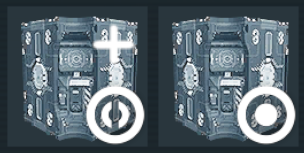
The Barge and Hangar core blocks
Civilian cores have unique access to Industrial Drives. These drives have immense thrust for hauling heavy cargo across long distances.
Barge
Barges are large utility ships, designed for mining operations or light cargo transport. They have a high storage and drive budget, and can equip a Utility Hangar to carry a small skiff to aid in mining, welding, or grinding.
Barges can also use refineries and assemblers to aid in ore processing while mining.
Hauler
Haulers are dedicated cargo transports, trading the flexibility of the Barge for the capacity to transfer a vast amount of resources at a time. Haulers have a huge storage and drive budget.
Military Cores
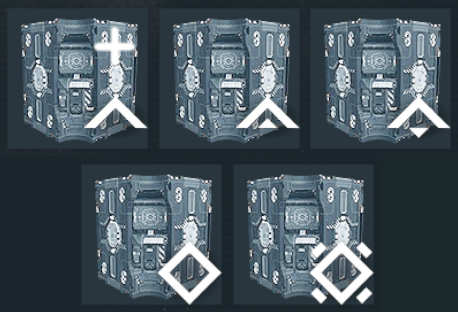
The military core blocks
Smaller military ships are built for speed, while larger military ships are built for raw firepower or defensive capability.
Military ships have unique access to torpedoes for long-range attack, and ceramic armour for defensive capability.
Picket
Pickets are fast lightweight patrol ships, capable of speeds up to 650m/s in combat, and of fielding high-quality sensors and a small complement of torpedoes. They are useful for scouting or harassing larger ships as part of a larger fleet, but can’t hold their own in combat for long.
Corvette
Corvettes are small agile combat ships, moving up to 550m/s in combat. Like the Picket it has access to high-grade sensors, but it also has access to more torpedoes or the ability to field a fixed railgun, allowing it to pack a punch in CQB.
Frigate
Frigates are medium-sized warships. While slightly slower than the Corvette at 500m/s, they have a significant increase in armament and armour. This allows them to serve as dedicated torpedo boats, or to equip a second fixed railgun for more aggressive brawling.
Cruiser
Coming soon.
Cruisers are large warships, with the potential to field a turreted railgun. This gives them far greater control over the battlefield, despite their reduced speed of 450m/s.
Cruisers are also capable of equipping a shuttle hangar, allowing them to carry a small utility ship for field repairs or salvage operations.
Carrier
Coming soon.
Carriers are huge support ships, designed for power projection and fleet assistance. While slower than other military ships at 300m/s, they can use military hangar blocks to deliver Frigates, Corvettes, or Pickets to the frontlines.
While too slow to chase anything, it can equip a turreted railgun and enough torpedos to make other ships think twice about approaching.
Battleship
Coming later.
Dreadnought
Coming later.
Station Cores
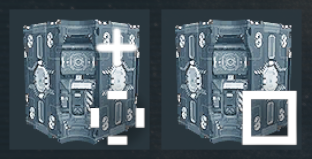
The Outpost and Installation core blocks
Grids with station cores can still be converted to ships and moved, but have very limited top speeds in combat.
Outpost
Outposts are medium-sized stations, capable of a small amount of resource production and storing a respectable volume of cargo. They are ideal for keeping near mining or hunting sites, and their access to welders makes them useful as forward operating bases for field repairs.
Installation
Installations are large stations with a significant production budget. With access to a large number of welders, they are ideal for serving as large shipyards and central processing facilities.
Installations can also equip Station Hangar blocks, allowing you to safely store large ships while not in use.
Installations are limited to 3 per player across the entire server. Choose their locations wisely.
Troubleshooting
Grid stuck at low speeds and HUD shows a speed punishment
Make sure your ship core is turned On, and that you aren’t exceeding block or PCU limits.
Cannot place block - “violated directional locking”
The block you are attempting to place must face the correct direction for your ship - backwards for drives, and forward for fixed railguns or directional sensors.
Toggling your HUD to Full mode with Tab will display prompt arrows near the block placement hologram to help align your block to the correct direction.